 Tarun Kumar Reddy Atmakuru |
 Nov 28, 2025

Table of Content
Focus on what matters. BIXO handles the rest!

Spending hours doing the same routine work every day can make you feel tired and hold you back. When you learn how to automate repetitive tasks, you save time, make fewer mistakes, and focus on the work that actually matters. The best part is that automating repetitive tasks isn’t just for big companies. You can start small and still see a huge difference.
In this blog, you’ll see simple ways to automate repetitive tasks, follow a step-by-step process, and discover tools that actually make your daily work easier. By the end, you’ll know how to start automating tasks and make your workflow smoother.
What Is the Process to Automate Repetitive Tasks?
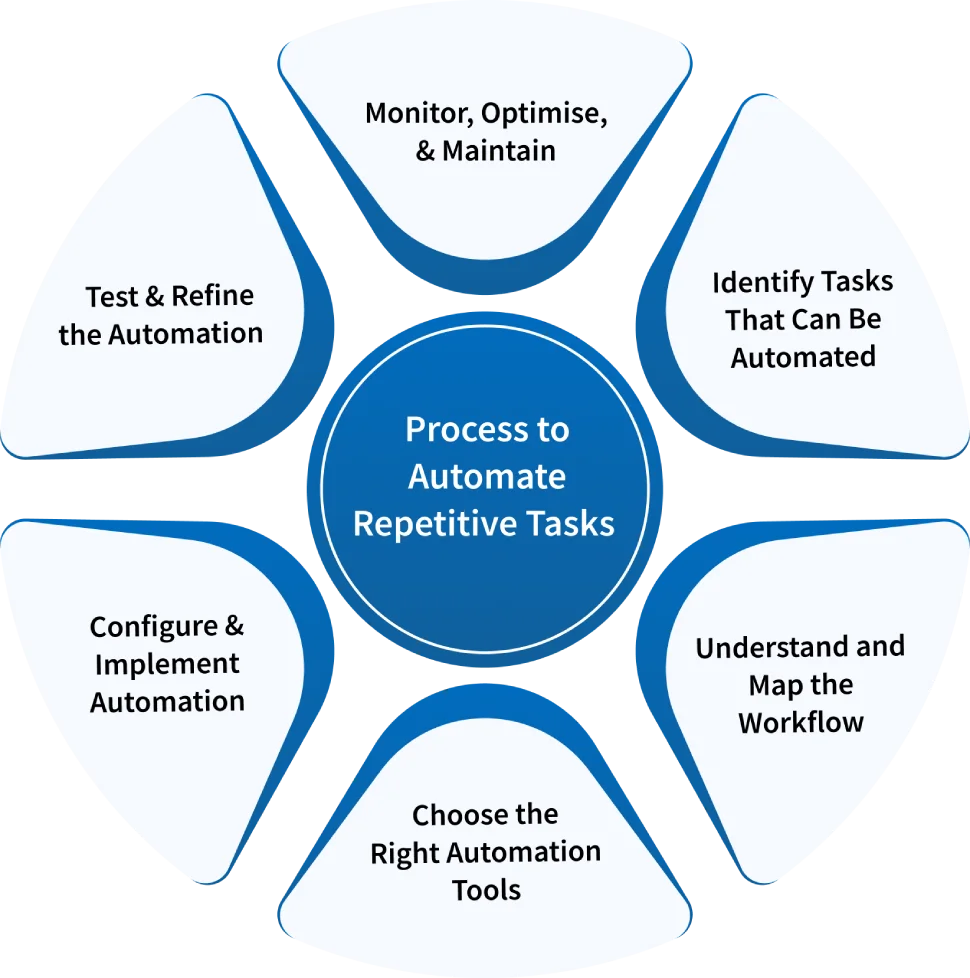
Automating repetitive tasks saves you time and helps you work smarter and cut down on mistakes. The key is to follow a simple process, so automation makes your day easier, not more complicated. Here’s a simple way to get started, step by step.
Identify Tasks That Can Be Automated
Take some time to list out the things you do every day or every week. Then look for the ones that feel repetitive and follow the same pattern each time. You can divide them into simple groups like data work, communication, or admin tasks. Keep in mind that you do not need to automate everything.
Just focus on the tasks that eat up time or cause small mistakes. That is where automation will make the major difference in how smoothly your day runs.
Understand and Map the Workflow
Before you start automating, take time to understand how the process actually works from start to finish. Break it down step by step including who is involved, what tools are used, and where things usually slow down. Try sketching it out with a simple flowchart so you can understand the process clearly.
It also helps to talk to the people who do the work every day since they know where the small delays and issues happen. Once you understand the process fully, you’ll know exactly which parts make sense to automate and which ones need fixing first.
Choose the Right Automation Tools
Once you get a clear idea about what needs to be automated and how your process works, it is the right time to find the right tools for automating repetitive tasks. There are so many options in the market to choose from. In that, some are great for simple jobs like sending reminders or moving files, while other automated tools, like BIXO, help to automate team follow-ups and simplify task management.
Select the tools that fit how you already work, match your budget, and are easy to set up. Make sure they work well with the software you are already using and keep your information safe. The right tool should make your life easier, not more complicated. When you choose wisely, automating repetitive tasks becomes simple and saves you time every day.
Configure and Implement Automation
Now it’s time to put your plan into action. Start with the easiest tasks, like creating reports, updating records, or sending notifications. Most automation tools make this simple with ready-made templates or drag-and-drop features. Set up each step carefully and test as you go. It also helps to involve your team so everyone knows how the new process will work.
Team feedback can help you catch small mistakes before they become bigger problems. Introduce automation little by little instead of doing everything at once. This way, you’ll see results quickly and learn how to adjust each setup before moving on to bigger, more complicated tasks.
Test and Refine the Automation
Once you know what you want to automate and how the process flows, it’s time to choose the tools that will make it happen. There are plenty of automation platforms out there. Some of them are meant for simple tasks such as reminders or file transfers, while others are meant to be able to automate complicated workflows that might involve multiple systems.
Look for tools that fit your needs, your budget, and your setup. Make sure they integrate well with your software and are easy to manage. Security and ease of use are also important, since you do not want to spend hours learning how to use the tool. When done properly, picking the right automation software makes the simple repetitive tasks easier, scalable and worth the time you put in.
Monitor, Optimise, and Maintain
Automation isn’t something you can just set and forget. You need to watch how it performs as your processes and tools change. Check your automated workflows regularly to make sure they’re still working well and doing what you need. Keep track of performance, spot any delays or errors, and update the automation whenever your software or team’s processes change.
For example, if you switch to a new tool, your automation might need a few changes to keep everything running smoothly. BIXO makes this easy. It’s an AI assistant that tracks your team’s tasks, sends real-time updates, and follows up on deadlines for you. You can manage your team easily without daily check-ins, giving you more time to plan, support your team, and get things done efficiently.
By watching how your automation is working and using a tool like BIXO, your tasks stay on track, your team stays coordinated, and you save a lot of time.
Conclusion
Figuring out how to automate repetitive tasks can really change the way you work. By picking the right tasks, mapping out your workflow, and choosing tools that fit, you can save time, cut down on mistakes, and make your day smoother. Automating routine tasks keeps your work on track and lets you focus on planning, solving problems, and growing your work instead of getting stuck in repetitive tasks. With the right approach, your workflow becomes smarter, more efficient, and much less stressful.
FAQs
Repetitive tasks are the routine, predictable jobs that take up a lot of your time, like entering data, sending follow-up emails, or creating reports. Automating them helps you save time, avoid mistakes, and focus on work that really matters.
Begin by making a list of the tasks you do every day and week. Look for the ones that are repetitive, follow clear rules, and take up a lot of time. Start with tasks that often lead to mistakes or eat up the most time.
Automation tools can be simple, like apps that schedule tasks or send reminders, or more advanced platforms that handle complex workflows across different systems. Pick tools that match the way you work, fit your budget, connect easily with your existing software, and are simple to use.
Automation isn’t something you set once and ignore. You still need to monitor your workflows, see how things are running, fix any issues, and update processes whenever your tools or team practices change. Doing this keeps your automation running smoothly and helps you get the most out of it every day.
Get a demo of BIXO

Recommended Blogs
7 Best AI Scheduling Assistants for Smarter Workdays
Struggling to stay on top of tasks and meetings? Discover the 7 best AI scheduling assistant tools to streamline your day and boost productivity with ease.
Tarun Kumar Reddy Atmakuru |
Oct 17, 2025
Top AI Work Assistants to Boost Productivity
Boost your productivity with the best AI work assistant tools. Discover top picks for automating tasks, staying organised, and managing work smarter in 2025.
Tarun Kumar Reddy Atmakuru |
Oct 17, 2025
AI Work Schedule Generator for Smarter Planning & Productivity
Tired of messy schedules and calendar conflicts? Explore how AI-powered work schedule generators save time, reduce stress, and boost team productivity.
Bhuvana Bitra |
Oct 17, 2025
×
Focus on what matters. BIXO handles the rest!